Seal the media source first
The Before Copying group of the plan sheet holds two switches: Seal the media source first and Copy anyway if the seal finds a problem.
A seal hashes the media source where it stands and records each file as original. The offload then compares each copy against that record. The job records a copy that agrees as verified. If the media source no longer matches its seal, the job records that file as failed.
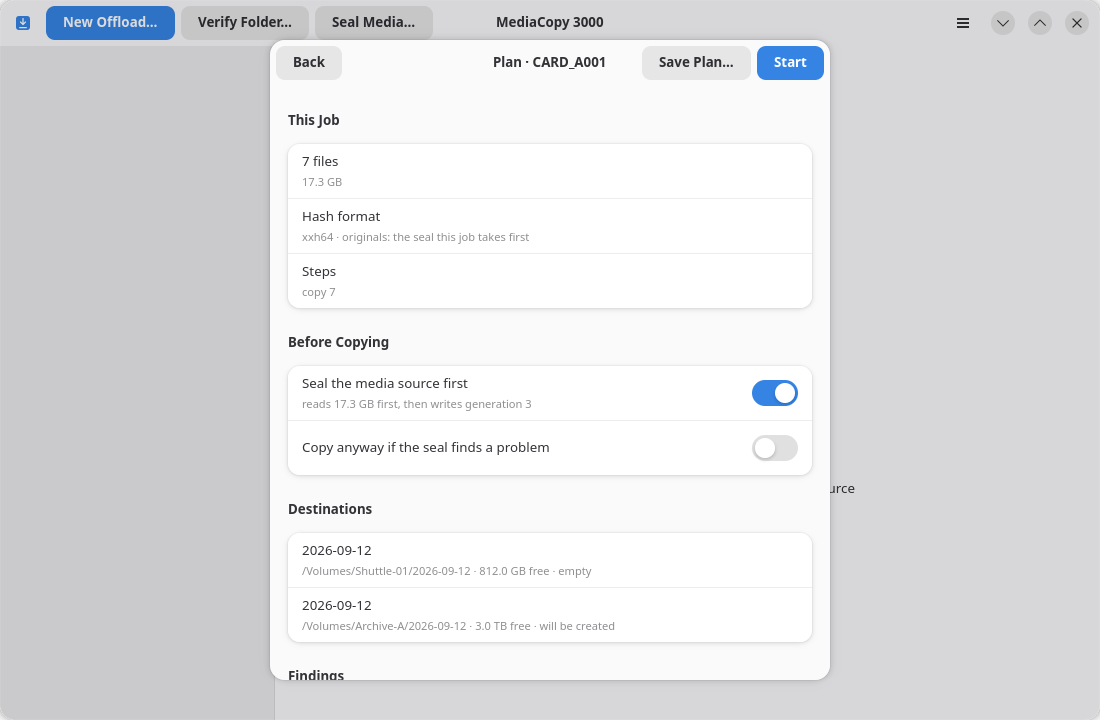
Seal the media source first
| Switch | What the job does |
|---|---|
| On | Read the whole media source and record its hashes. Then copy. |
| Off, and the media source holds a history | Check the copies against the generations it already holds. |
| Off, and the media source holds no history | Copy with nothing to check against. The job records every file as original. |
The switch costs a full read of the media source. The subtitle of the row says how many bytes that is, and which generation the seal will write.
Turn it on for a media source that comes straight out of a camera and holds no history. Leave it off for one that was sealed already, because a second seal records nothing that is new. The plan warns you with folder is already sealed in that case.
A change to either switch computes the plan again, under the same job. You can never approve a plan that belongs to the setting you left.
Copy anyway if the seal finds a problem
The sheet shows this second switch only while the first one is on. It says what the job does when the seal pass itself records a failure, for example a file the media source can no longer read.
| Switch | What the job does |
|---|---|
| Off | Stop before copying. The job writes nothing to any destination. |
| On | Copy anyway. The failure stays in the record. |
Off is the safe answer, and it is the one the sheet starts with. The job then fails with the seal failed for N of M files; nothing was copied.
Turn it on when the media source is damaged and a partial copy is better than none. The manifest records which files failed, so the record still says what happened.