Findings
A finding is something the plan learned that you must know. Every finding is a blocker or a warning.
- A blocker stops the job from starting. Start stays grey.
- A warning stops nothing.
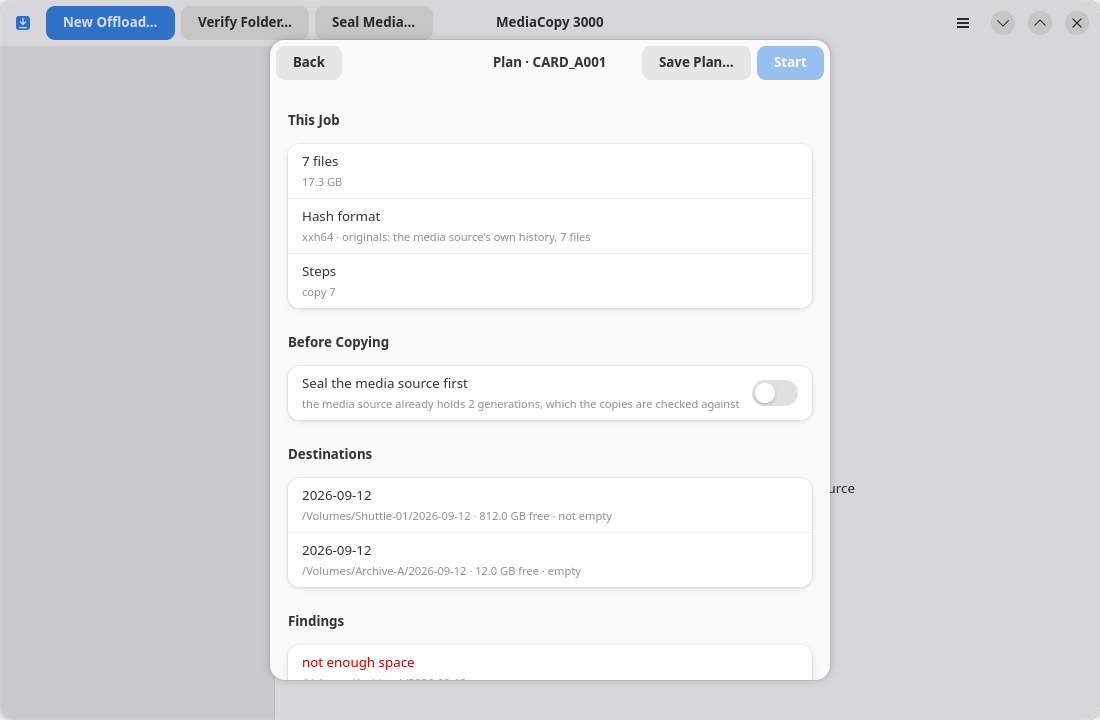
Each finding has a code. The code is the same in the interface, in the report and in the tests, so the three cannot disagree about what a finding is.
Why a blocker is not a question
A blocker is not a question. The sheet has no button that accepts it. The job cannot start until the cause is gone.
The blocker destination holds files that are not on the media source shows why. An offload writes each file under a temporary name, and then renames it to its final name. If a write of a new file fails, the job deletes both names. If a write over an existing file fails, the job deletes the temporary name and keeps the old file. The job can promise this only for files it knows: the files of the media source. A file it does not know can be lost, so the sheet refuses the folder.
Blockers
| The sheet says | What it means | What to do |
|---|---|---|
source not found | The media source is not at that path. | Mount it, or pick the path again. |
destination holds a partial copy | The destination already holds some files of this media source. | Choose Resume or Replace under Before Copying. The page Offloading a media source explains both. |
destination holds files that are not on the media source | The destination holds a file, a folder or a generation that the media source does not hold. | Pick an empty folder, or a folder that does not exist yet. The detail names the first such file, folder or generation, in sorted order. |
destination was copied from another media source | The destination carries a history whose generation does not agree with the media source's generation of the same name. | Pick another destination, or verify this folder with Verify Folder…. |
destination cannot be read | The folder could not be read at all. | Check that the volume is mounted and that you can write to it. |
destination history cannot be read | The destination holds an ascmhl folder, but its chain or a manifest it names could not be read. | Read the destination with another ASC MHL tool, or pick a different destination. |
not enough space | The destination holds less free space than the job needs. | Free space, or pick another volume. |
hash format cannot be settled | The records this job must check against hold more than one hash format. | Verify the folder in one format first, or offload to a fresh destination. |
chain names no manifest | The chain file is there and names no generation at all. A seal that was taken has been lost. | Read the folder with another ASC MHL tool before you write anything else to it. |
chain cannot be read | ascmhl_chain.xml is damaged or is not the file it claims to be. | Read the detail, which names the file and the parse error. |
a manifest the chain names cannot be read | A manifest the chain names is gone, or is there and will not parse. | The detail names the file, and says missing or gives the parse error. |
folder has no history | A verify job was given a folder with no ascmhl folder. | Seal the folder instead. Only a verify raises this. |
Warnings
| The sheet says | What it means | What to do |
|---|---|---|
source is empty | The media source holds no files. | Check that you picked the right folder. The job can run and will record nothing. |
folder is already sealed | The media source already holds a generation, and this job would write another. | Turn off Seal the media source first, or use Verify Folder…. |
Findings in the report
Every finding goes into the Plan block of the saved report, with its severity and its detail:
warning: folder is already sealed – generation 2The report keeps the warnings you accepted, so the decision stays with the record.